










The Leading AI Headshot Generator for Professionals
Changelog — Page 4
Filter
Filter
Facial Expression Editor – Create Thumbnails
You can now add expressive reactions to your photos to make your YouTube thumbnails stand out instantly.
What's New
Choose from a range of reactions like confused, disgusted, crying, or shocked. Perfect for thumbnails, memes, and short-form video covers. Our tool automatically matches lighting and tone so every expression looks realistic and consistent with your original photo.
- Choose from expressions like surprised, laughing, crying, or shocked.
- Perfect for thumbnails, memes, and short-form video covers.
- AI automatically matches lighting and skin tone for realistic results.
Where You'll See It
- Available now in the AI Editor > Face & Body Editing > Facial Expression Editor
- Accessible for both personal and team accounts.
Available now — Try our Facial Expression Editor!
New Hair & Makeup Editor – Instantly Try a New Look
You can now experiment with hairstyles, hair colors, and makeup directly in our AI Editor. Upload a photo and see your new look instantly!
What's New
Try different hairstyles, such as pixie cuts, bobs, or long waves, in a variety of colors. You can also apply lipstick, eyeshadow, blush, or mascara to see what suits you best. Perfect for testing new looks before hair appointments, planning event styles, or refreshing your profile photos.
- Try short, medium, or long hairstyles in different textures and colors.
- Apply lipstick, eyeshadow, blush, or mascara to see what suits you best.
- Perfect for testing haircuts before appointments, planning event looks, or refreshing your profile photos.
Where You'll See It
- Available now in our AI Editor > Face & Body Editor > Hair & Makeup Editor
- Accessible for all users, including Aragon Pro and team accounts
Available now — Try out new looks here!
AI Photo Packs – Easier to Find, Browse, and Create
Our AI Photo Packs are now easier to browse with new categories and a redesigned layout!
What’s New
- Popular & New: Quick access to trending and recently added packs.
- Categories: Packs are now grouped into themes like Travel & Vacation, Work & Career, Cozy & Aesthetic, and more.
- Search: Find specific packs faster with the new search option.
Browsing and trying packs is now smoother and more intuitive. Whether you’re creating photos for LinkedIn, dating apps, or personal projects, everything is now organized in one place!
Clothing Changer – Swap Outfits Instantly
You can now change your outfit in just a click with our newest Clothing Changer tool!
What’s New
- Choose from a wide range of professional and casual outfit styles.
- Choose what color your outfit should be! Choose from colors like navy, black, white, and many more.
- Upload any photo or select from your albums to apply the outfit change.
Whether you need a sharper look for LinkedIn, a casual outfit for a dating profile, or just want to try something new, our new Clothing Changer feature makes it easy to refresh your photos.
New Creative Packs – Musician, Foodie & Sports
We’ve added three new lifestyle-inspired packs that capture your passions and energy!
What’s New
- Musician Pack: Think concert halls, jazz bars, and recording booths. Great for album mockups, event posters, or artist profiles.
- Foodie Pack: Imagine ramen stalls, vineyards, and night markets. Perfect for recipe blogs, travel diaries, or showcasing your love of food culture.
- Sports Pack: See yourself playing tennis, soccer, running, and more. Ideal for team fan pages, vision boards, or Instagram posts.
These packs are designed to help you express your hobbies in ways that feel authentic and fun!
New Creative Packs: 1920s, 1970s, and Victorian Age
Step back in time with packs that bring history’s most iconic styles into the present.
What’s New
- 1920s Pack: Gatsby glamour and speakeasy charm. Perfect for themed parties, vintage-style shoots, or Halloween looks.
- 1970s Pack: Disco nights and retro street style. Great for old-film enthusiasts, music lovers, or anyone creating fun social posts.
- Victorian Age Pack: Elegant gowns and timeless settings. Ideal for storybook-style projects, historical cosplay, or niche creative communities.
These packs give you versatile, eye-catching photos that work across different platforms. Use them to:
- Post vintage-inspired looks on Instagram, TikTok, or Pinterest
- Gather costume or cosplay ideas for themed events
- Add unique visuals to personal blogs or moodboards
- Experiment with creative styles just for fun
Stand out with photos that feel bold and imaginative. Whether you’re sharing on social media, playing with themed content, or bringing a creative idea to life, these packs make it easy!
New Creative Packs: Las Vegas, Festival of Colors, and Safari
We’ve added three new packs that let you bring bold locations and experiences into your photos!
- Las Vegas Pack: Bright lights and nightlife energy. Great for playful IG Stories, themed party invites, or bold profile updates.
- Festival of Colors Pack: Inspired by Holi celebrations with vibrant splashes of color!
- Safari Pack: Natural backdrops and outdoor adventure. Ideal for dating profiles or adventure-themed projects.
These packs give you versatile, eye-catching photos that work across different platforms. Use them to:
- Share colorful posts on Instagram
- Refresh your personal site or blog with unique visuals
- Experiment with themed shoots for creative projects
- Spice up your dating profile with creative photos
Team Admin Controls – Configure Remix & Edit Tools
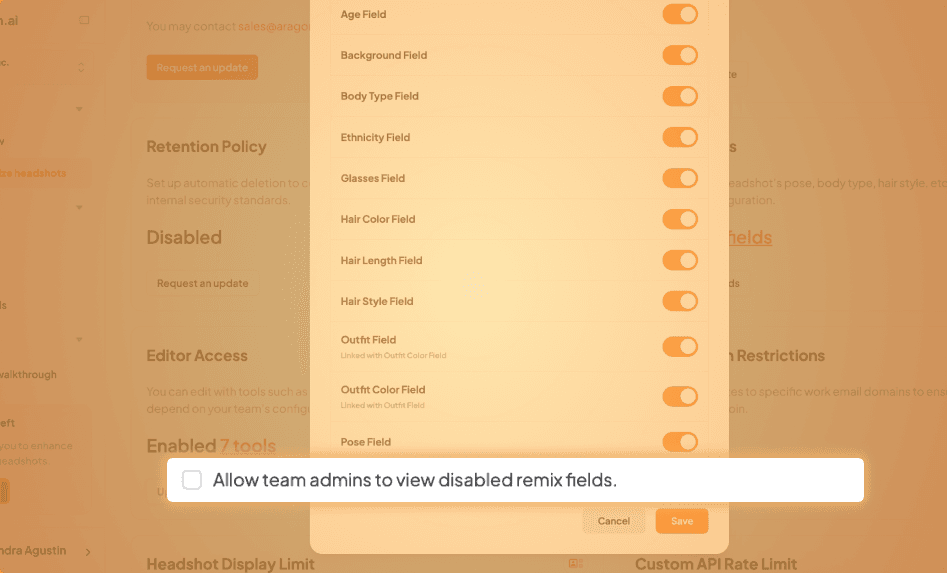
We’ve added new controls so admins can choose which tools team members use, while keeping full access for themselves.
What’s New
- Admins can now disable specific Remix options or Edit tools for team members.
- Hidden options remain visible and usable for admins.
Why It Matters
This provides admins with more flexibility to comply with company requirements without compromising access to the features they rely on. Team members can only change what’s allowed through the Remix feature, while admins keep full editing power.
Team Invites - Accept by Email or Join via Link Instantly
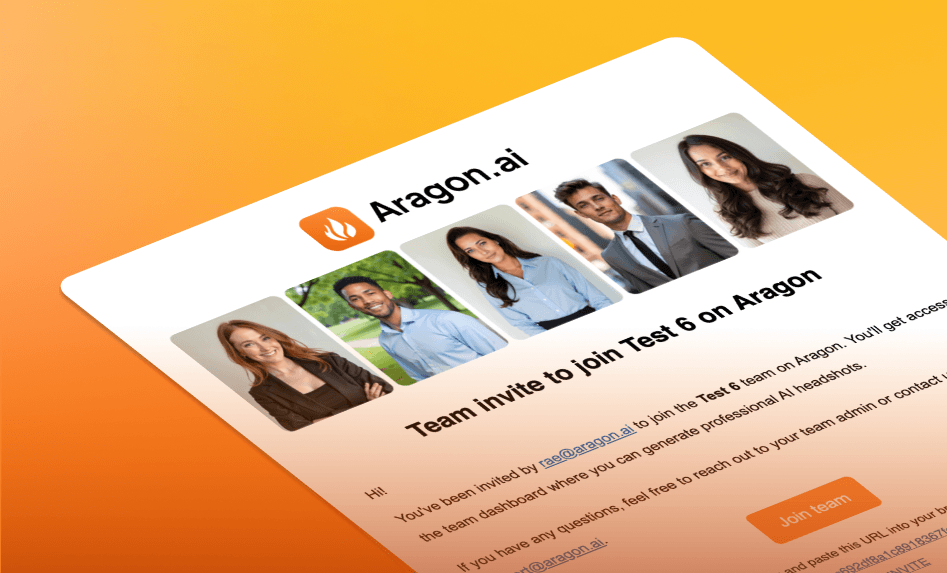 We’ve made some improvements to how team invites work!
- Invite by email: The person must click Accept from the email to join. Until then, they show as Pending. Email invites now last 7 days.
- Invite by link: If they’re logged in, clicking the link adds them instantly and takes them to their team dashboard. Links auto‑expire after 30 days, and creating a new link deactivates the old one.
This makes it easier to track who’s in, who’s pending, and ensures your invites stay clean and up-to-date. This is automatically live on your end, no action needed.
We've added two new tools to help you strengthen your professional presence right from your dashboard.
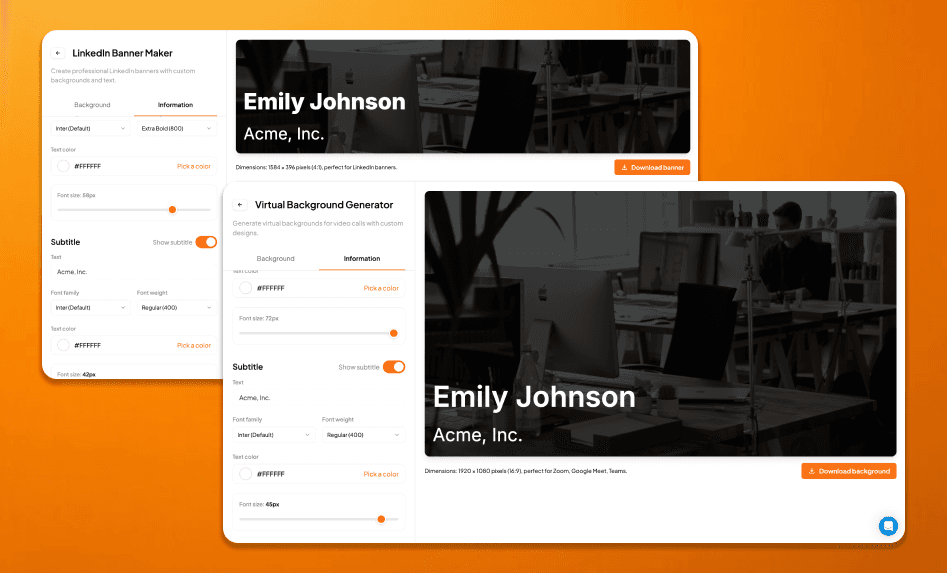
LinkedIn Banner Maker
You can upload a photo, pick a gradient, or choose a solid background. Then add your name, role, or tagline to create a professional LinkedIn banner.
Virtual Background Generator
Create clean, branded backgrounds for your video calls. Upload a background photo or choose a gradient or solid color, add optional text, and download in 16:9 format for Zoom, Meet, or Teams.
What's New
- LinkedIn Banner Maker – Upload your image, choose a gradient or solid color, and customize banner text with full control over size, font, and position.
- Virtual Background Generator – Create clean, branded backgrounds for video calls. Add text, preview instantly, and download in 16:9 format for Zoom, Meet, or Teams.
- Available now in your Aragon Dashboard under Free Tools.
- Accessible for all users, including Aragon Pro and team accounts.
Why It Matters
These tools make it easier to stand out and unify company branding across platforms, from polished LinkedIn profiles to clean, professional video call setups.
Available now — Try our LinkedIn Banner Maker or Virtual Background Generator here!
API Access & Zapier Integration – Automate Aragon with Your Apps
We've rolled out a new API section inside the Teams dashboard, giving admins direct access to manage their API keys and connect Aragon with other apps.
What's New
- API management page – Generate, copy, or delete your API Key directly from the dashboard.
- Secure key handling – Keys can be regenerated at any time, with clear confirmation steps and success toasts.
- Zapier-ready – Use your API Key to link Aragon to Zapier and build custom automations.
- API documentation – Full endpoint reference now available in the dashboard for supported actions:
- Create or delete teams
- Invite or revoke team members
- Retrieve team details and settings
- Get invite records
Why It Matters
This update gives admins self-serve API access for the first time, making it easier to plug Aragon into workflows, automate team management, and connect with 8,000+ Zapier apps.
Available now — Access your dashboard and retrieve your API key by clicking HERE!
Enterprise Settings – Admin Update Controls
Admins can now update certain settings directly from the Enterprise Settings tab for easier configuration.
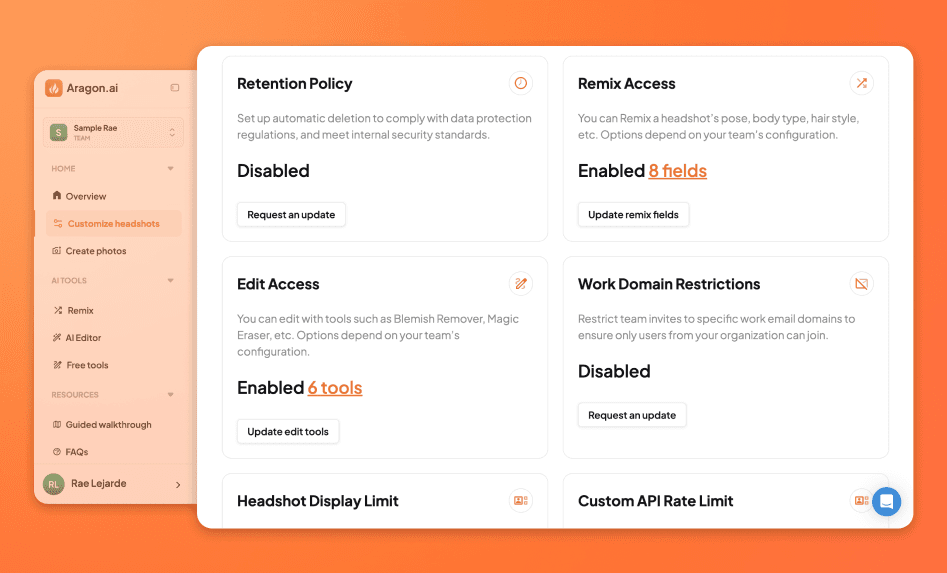
What's New
- Editable settings: Retention Policy, Remix Access, Edit Access, Work Domain, Headshot Display Limit, Custom Backgrounds, and Custom Attires.
Why It Matters
This release gives admins more control to manage headshot policies and brand consistency.
Available now — Click HERE to access your dashboard and view the new settings.
Custom Backgrounds – Branded Headshots for Teams
Teams can now take their headshots a step further with Custom Backgrounds, available in Enterprise Settings.
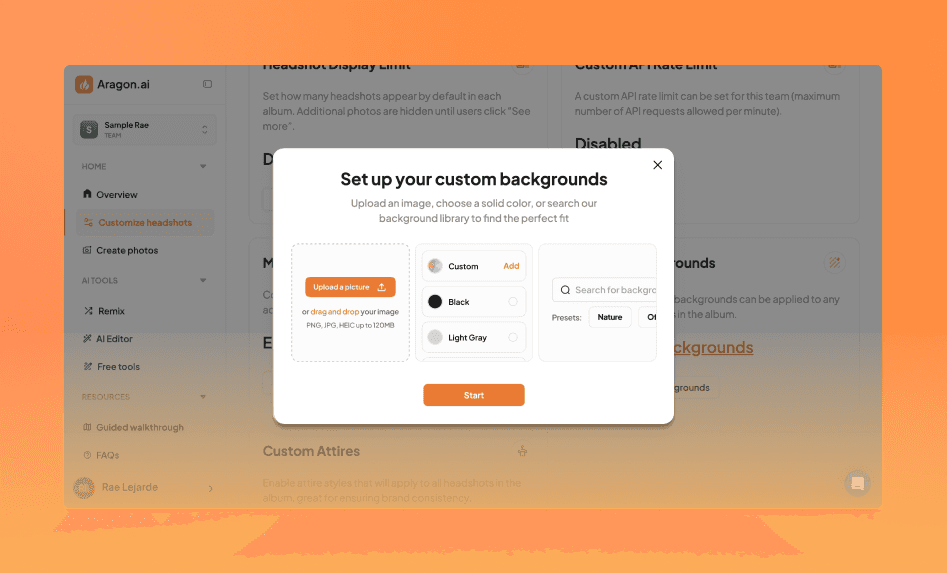
What's New
- Custom backgrounds for every team: Upload up to five branded backgrounds (like office shots, logo walls, or brand colors) that apply consistently across your team's headshots.
- Automatic application: Whenever a headshot is favorited, a version with your team's chosen custom background(s) is automatically generated and added to their album.
- Streamlined admin controls: Admins can enable, update, or remove backgrounds directly from the Teams dashboard.
- Cleaner invites & editing: Backgrounds are managed at the team level, keeping everyone's images on-brand with no extra steps for team members.
Why It Matters
This update makes it simple for teams to ensure every headshot reflects their brand identity. Custom Backgrounds give teams more control and a more professional look, without adding extra work for individual members.
Available now — Click HERE and access your dashboard to start customizing your team's backgrounds.
Team Dashboard Enhancements
Smarter tools for managing headshots, tracking team activity, and navigating your workspace.
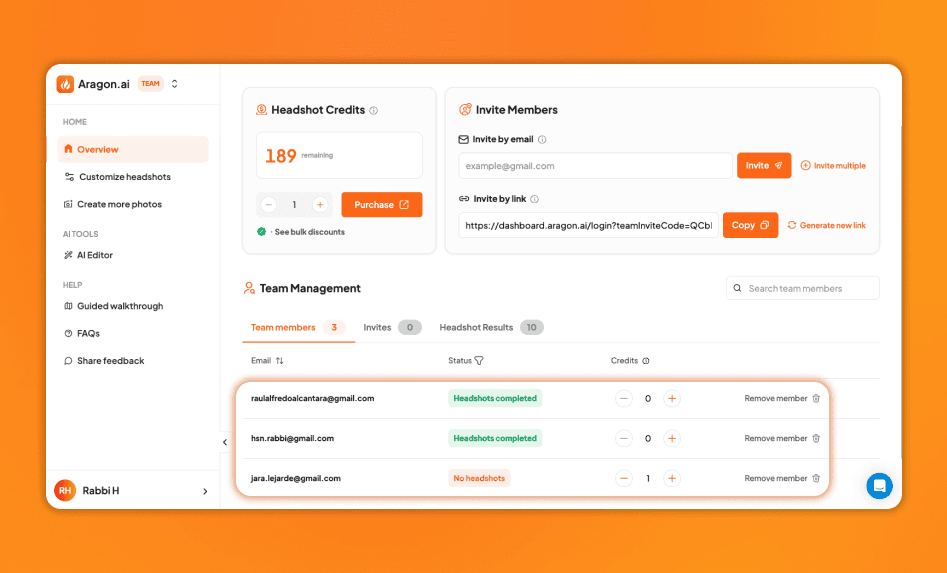
Team Member: Improved Status Tracking and Filtering
We’ve redesigned the Team Members tab to give you clearer visibility into each member’s headshot status.
- See at a glance whether team members have completed headshots, have none, or if their data was deleted
- Statuses are now color-coded for quick scanning
- New multi-select filters make it easy to focus on specific groups, like users with completed albums or those who’ve removed their accounts
- Clicking a status takes you straight to that member’s headshot results when available
Clearer Album Insights
In the Headshot Results tab, you’ll now see helpful tooltips that clarify album details. Hover over dates, edit counts, or favorites to get quick context without extra clicks.
Click HERE to check out our team features!
Zapier Integration - Connect Aragon to Your Other Apps
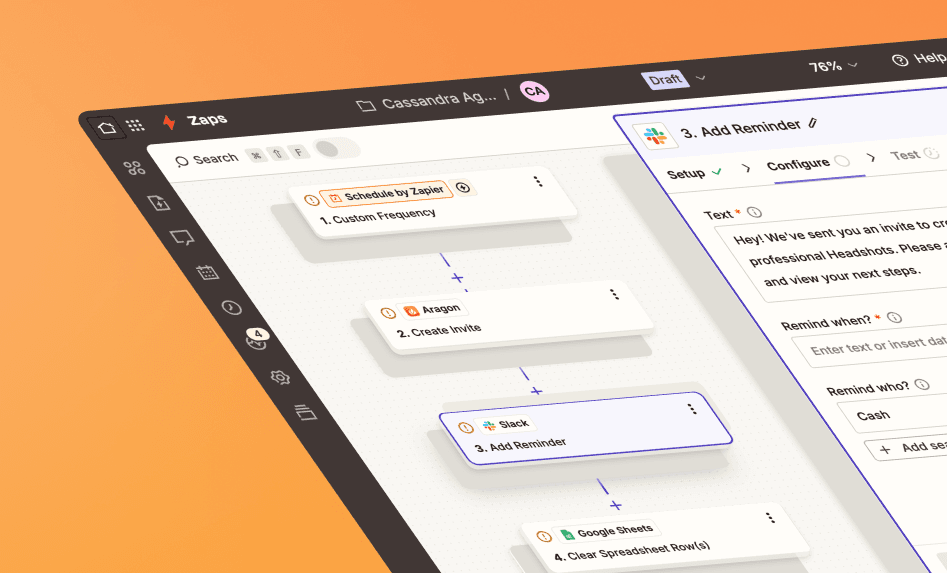
Now you can connect Aragon with your favorite tools like Slack, enabling them to work together automatically without any coding required.
Set up simple automations to streamline common tasks. For example:
- Slack or Deel → Aragon: If someone is invited to Slack or Deel, they’re automatically invited to their Aragon team to create their headshot.
- Google Sheets → Aragon: Add a person to a spreadsheet and instantly invite them to Aragon.
- Forms → Aragon: If someone fills out a form, they'll receive an invite to Aragon.
This integration means fewer manual steps, less room for mistakes, and faster onboarding for your team.
How to Turn It On (Quick Steps)
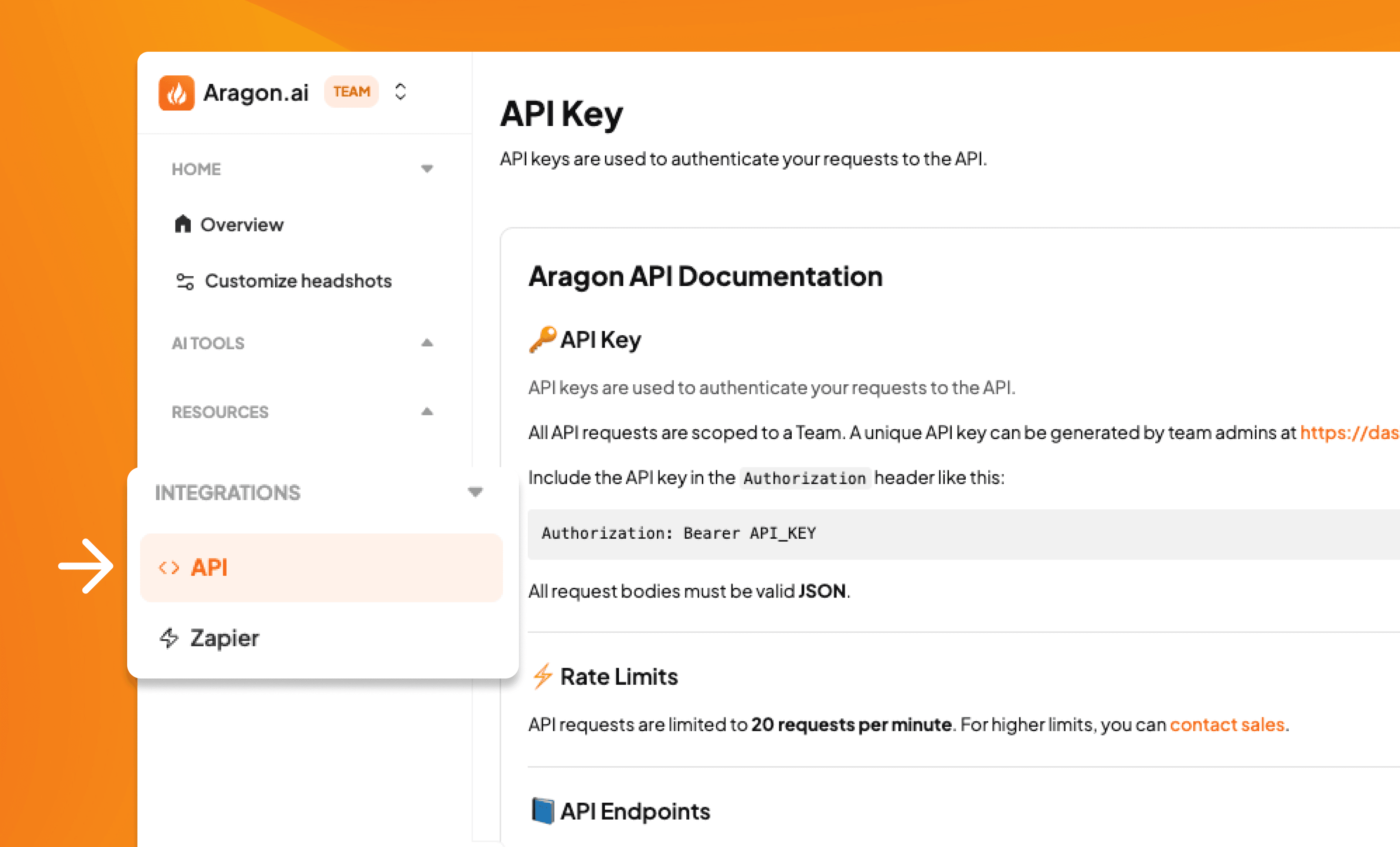
- Open Integrations in your Aragon Teams dashboard and select Zapier.
- Sign in to Zapier and connect your Aragon account using your API Key (found in Aragon Teams dashboard → Integrations → API).
- Choose your triggers and actions, then save your settings.
Click HERE to access your dashboard and connect to Zapier!
New Packs: Pet Lover, Santorini, Red Carpet & More
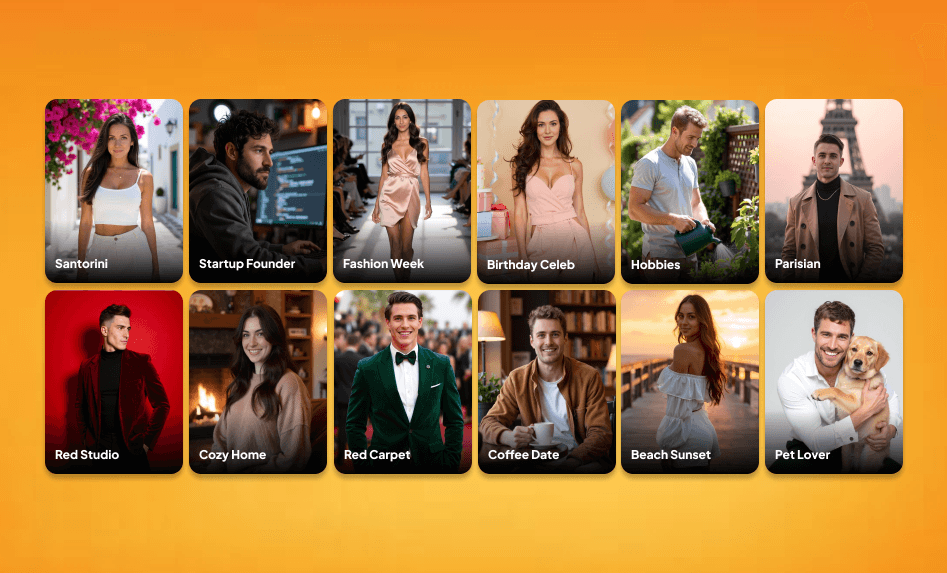
We’ve just launched our biggest batch yet—14 new AI photo packs so you can try fresh looks, locations, and styles—fast.
What’s New
- Pet Lover
- Red Studio
- Santorini
- Bali
- Parisian
- Music Festival
- Beach Sunset
- Coffee Date
- Red Carpet
- Cozy Home
- Hobbies
- Birthday Celebration
- Fashion Week
- Startup Founder
Each pack is designed to give your photos a unique twist, whether you’re going for cozy, adventurous, glamorous, or professional.
QR Upload – Send Photos from Your Phone
Uploading your photos is now faster and easier! Just scan the QR code on your desktop and upload straight from your phone. No cables, no emails, no hassle.
- In the Upload photos step, scan the QR code in the lower-left corner.
- Pick the photos you want from your gallery, camera, or files.
- Click upload and they’ll appear instantly on your desktop!
- Need help? Open the "How do I upload from my phone?" modal for step-by-step instructions and a larger QR code.
Click HERE to create new AI headshots!
Improved email signature
We’ve upgraded our email signature generator to give you customizable templates to choose from.
What’s better
- More layouts and cleaner design for a professional look
- Pick your own headshot, set brand colors, and add your role and company details
- Include clickable social links so contacts can connect with you instantly
- Live previews let you perfect your signature without test emails
Available now — update yours by clicking HERE.
Team headshot updates
A streamlined way for teams to manage headshots, edits, and advanced options.
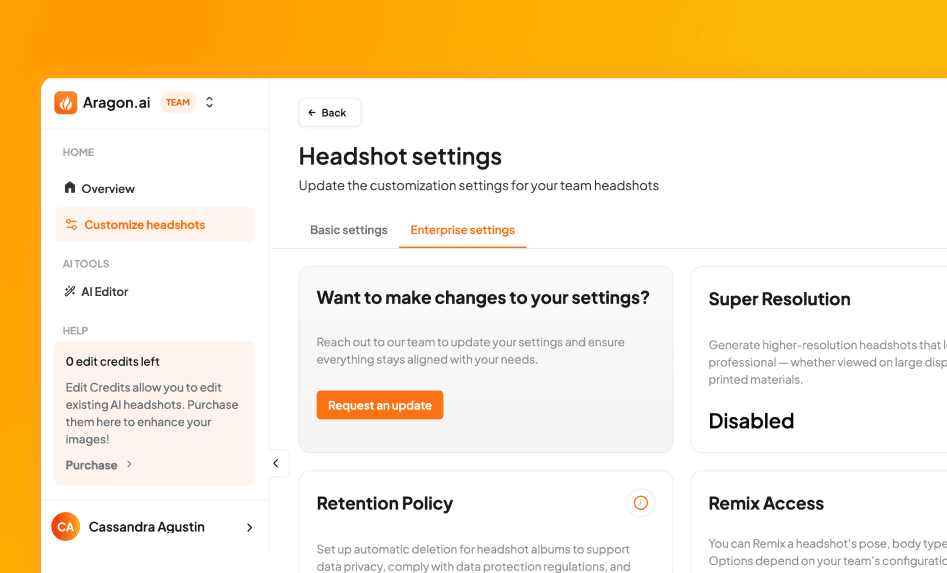
Shared edits & credits
- Edit and Remix credits are now pooled across the team—no manual distribution needed
- Every team member and admin gets 1 free edit and 1 free remix
- Clear prompts appear when limits are reached, guiding teams to add more if needed
Enterprise settings
- New view-only Enterprise Settings page shows options like Super Resolution, Remix, Edit Access, Domain Restrictions, and more
- Displays either your team’s current configuration or a quick “Book a demo” if you want to customize or enable the settings.
Live now for all teams. Click HERE to check out your team’s dashboard!
Background Changer – Now with search
Search for Backgrounds by Keyword
We’ve added a powerful new search bar to the Background Changer, making it easier to find exactly the style or setting you want.
- Simply type what you’re looking for — like “modern office,” “city skyline,” or “soft greenery”
- Matching backgrounds will appear instantly on the right side of the editor
- Click any background to apply it immediately to your uploaded photo
Updated Background Library
We’ve cleaned up our background options to keep your results looking crisp and professional.
- Removed older backgrounds that were blurry, overly zoomed, or unrealistic
- Added new backgrounds with better lighting, clearer framing, and more natural looks
- Refreshed key categories, including Nature, Office, City, Abstract, Studio Light, and Studio Dark
Image Upscaler: New Slider
The Image Upscaler now includes a step slider for precise control over export resolution.
- Choose from 2x, 2.5x, 3x, 3.5x, and 4x scaling
- Designed for users who need sharp, high-res results
Click HERE to try out our tools now!
Pride Month Initiatives
To honor Pride, we’ve prepared a set of limited-time features and visual updates that celebrate self-expression in all its forms. Whether you're updating your LinkedIn, sharing something bold on social, or simply looking to feel seen—we’ve got you.
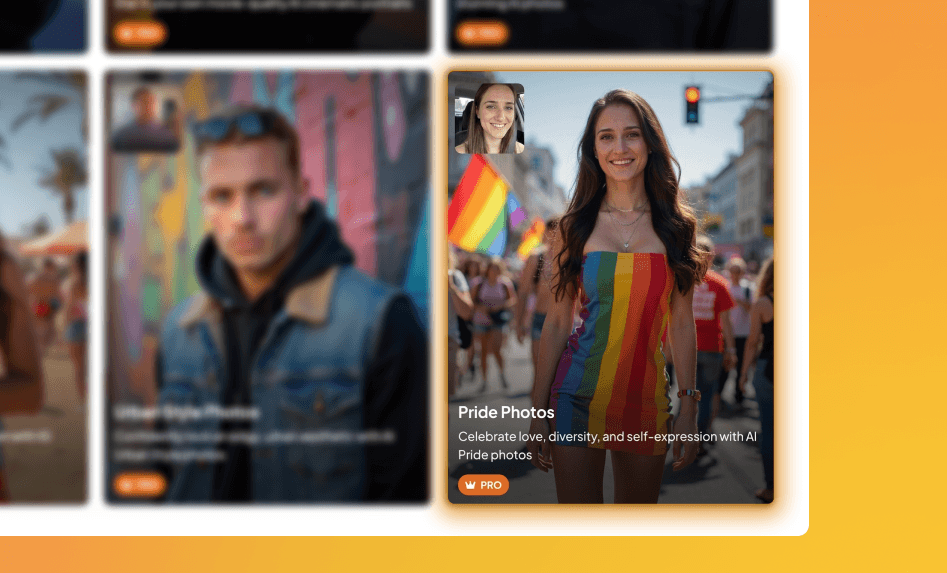
New Pack: Pride
Our Pride Photo Pack is here—just in time for Pride Month. It’s a mix of polished, professional headshots for LinkedIn and bold, expressive portraits designed for sharing just for fun.
- Includes diverse backdrops, colorful lighting, and editorial-style portraits
- Created to honor all forms of identity and self-expression
- Perfect for profile updates, posts, and showing up exactly as you are
Use it to celebrate yourself, your community, or simply to try something joyful and new.
Limited-Time: Pride Flag Backgrounds
For Pride Month, we’ve added a special feature to the Background Changer:
- Instantly remove your background and replace it with Pride flags and other Pride backgrounds
- Available for a limited time to help you celebrate your identity visually or help you show your support
Click HERE to join us in celebrating Pride month!
New AI Photo Packs – Luxury, Influencer, and Urban Pack
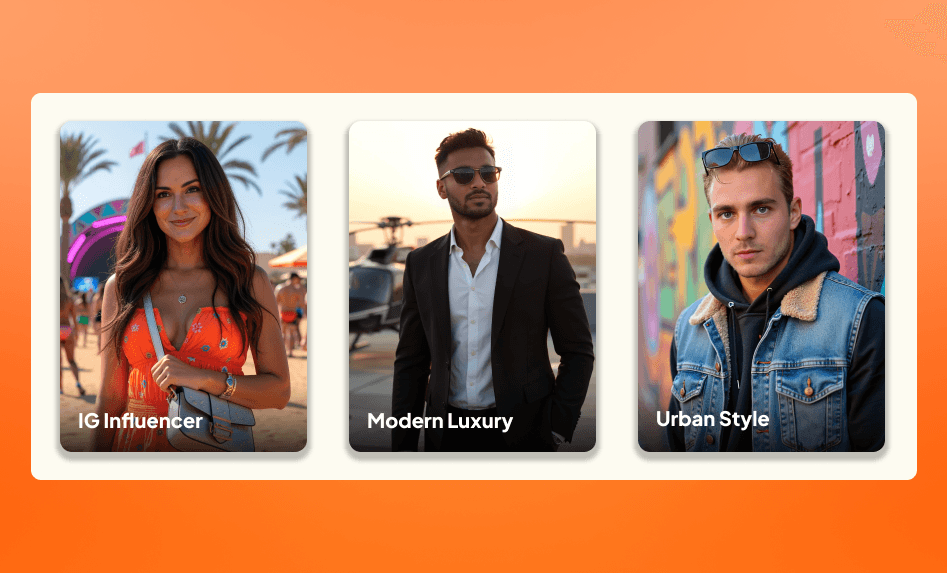
We’ve rolled out three stunning new AI-generated photo packs—designed to elevate your feed. Each one offers personalized photos made to match your look, pose, and background.
IG Influencer Pack
Capture the lifestyle of your dreams with travel-ready looks in sunny music festivals and stylish locations. This pack channels the vibe of top creators, effortless and made to go viral.
Modern Luxury Pack
Bold, high-end fashion set in luxury environments like rooftop helipads and skyline lounges. Includes sharp suits, refined dresses, and minimal accessories that signal confidence, wealth, and style.
Urban Style Pack
Focused on everyday streetwear captured in city settings. Perfect to fit your vibe!
Click HERE to try out our new packs!
Book a demo
The Teams landing page now includes a “Book a demo” call-to-action. Clicking it opens a calendar link where you can schedule a time with our Sales team.
This is designed for larger teams looking to explore our teams product in-depth including branding options, or custom pricing through our Enterprise plans.
Status Filters
Team admins can now view the headshot status of all members directly from the team dashboard. Statuses include:
- Headshots completed
- No headshots
- Account deleted by user
Admins can also filter by status to quickly identify team members who haven’t generated headshots yet—making follow-up easier and more actionable.
Multiple Admin Access
Team admins can now invite co-admins from the new Manage Admins page in Settings.
Co-admins have the same privileges as the main admin, with one exception: they can’t add or remove other admins.
Co-admins can:
- Purchase headshots
- Distribute credits
- Invite team members
- Monitor headshot progress
- and many more!
Teams can now manage admin tasks collaboratively without needing to log in through a shared account.
Click HERE to book a demo and check out our teams feature!
New Pack: Graduation
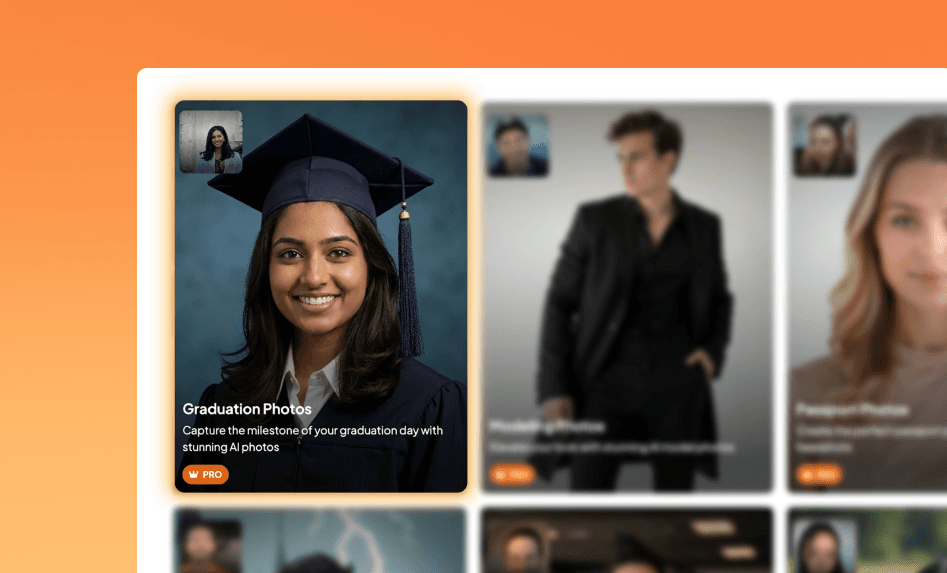
We just dropped the Graduation Pack—a new photo experience built to celebrate how far you've come (or the version of you who’s just getting started).
Whether you're graduating this year, manifesting your moment, or just want to see yourself in cap-and-gown glory, this one’s for you.
What You’ll Get
- Iconic cap & gown portraits across studio and campus settings
- Polished, professional shots—ready for LinkedIn, family group chats, and everything in between
- Editorial-style images that feel like your own personal grad photoshoot
Access
- Aragon Pro users: Just head to your dashboard and select the Graduation Pack—it’s included in your subscription.
Click HERE to try out our Graduation Pack!